

Key concepts
What each thing is in TukiMate and how they relate: organization, conversations, analyses, CRM, and more.
TukiMate gathers your business conversations (meetings, calls, chats, and emails), analyzes them with AI, and connects them to your team’s sales work. This guide explains the main pieces; each one has its own guide for the detail.
The menu at a glance
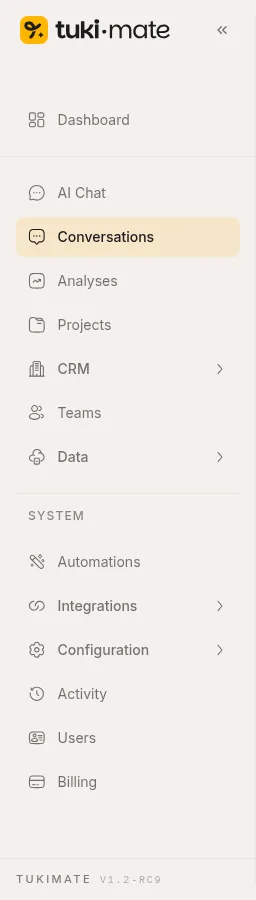
The menu groups daily work (conversations, analyses, projects, CRM, teams, and data) and, in the SYSTEM section, administration. What you see depends on your role: see Roles and access.
The concepts
- Organization: your company inside TukiMate. All data belongs to your organization and only the people who are part of it can see it. It is adjusted in General settings.
- Users and roles: each person has a role (Owner, Admin, Analyst, Editor, or Viewer) that defines which screens they see and what they can change. See Roles and access.
- Conversation: a recording or transcript. It is created from a transcript, an audio file, a recording, or a meeting bot, or it arrives on its own from a connected application. It has a date, type, project, team, source, tags, and participants. See List and filters, New conversation, and Conversation detail.
- Analysis: the AI’s reading of one or more conversations: summary, topics, entities, and more. It uses an analysis configuration, in Individual or Aggregate mode, and runs as a background job. See Run analysis, Analysis jobs, and Analysis results.
- AI chat: an assistant you ask about your conversations, analyses, and data. See AI chat.
- Contacts, clients, and opportunities: the CRM. Contacts are people, clients are the organizations you work with, and opportunities are the deals in your sales pipeline. See Contacts, Clients, and Opportunities.
- Projects, teams, tags, and sources: ways to organize. A project groups conversations, a team groups people (and, except for Admins and Owners, defines which conversations each one sees), a tag is a free-form mark, and the source is where the conversation came from. See Projects and Teams.
- Automations: rules with a trigger, conditions, and actions that act on their own. See Automations.
- Connected applications: integrations that bring in conversations from other tools. See Applications.
- Anonymization: protects emails, phone numbers, and identifiers before they reach AI models. See Data anonymization.
Next steps
Dashboard
Understand General View and My Activity: counters, recent lists, and what needs your attention.
Roles and access
How the TukiMate menu changes with your role and what to do when a screen is not available to you.
Notifications
See your alerts from the bell, open each topic, and clear your inbox.